Wait a few business days, remind the person what your first message was about, and bring one new thing: a resource, a recap or a question they can answer in a word. Send two follow-ups at most. If there is still nothing, close with a friendly last note and move on.
Most people who search for this have already sent a message and heard nothing. That silence is rarely a no. People are busy, a message arrives on a bad afternoon, and it sinks below twenty others. A good follow-up gives your note a second chance at a better moment. A bad one makes the first message look worse.
Below are the questions people ask most about following up, answered the way we would answer a colleague. If you want a draft for your exact situation, the free Follow-up Message Generator writes one from your details.
How long should you wait before following up?
A few business days after a message with no reply. That gives the person a normal work rhythm to see it, without letting your note go completely cold. If you sent it on a Friday, count from Monday.
The exception is anything that follows a live conversation. After a call, a meeting or an event, follow up within a day, while they still remember your face and what you talked about.
| Situation | When to send | What to bring |
|---|---|---|
| They accepted your connection request | The same day or the next | Thanks and one easy question |
| No reply to your first message | A few business days later | A resource or a yes-or-no question |
| Still no reply | About a week after that | A short, polite last note |
| After a meeting or call | Within a day | Recap, what you promised, next step |
| After an event | Within a day or two | A reminder of your chat and anything you offered |
What should you say when someone has not replied?
Something new. The reason “just checking in” fails is that it gives the reader nothing to respond to except guilt. Add a reason to reply instead.
Hi Dana, following up on my note about onboarding. I put together a short checklist on how a similar team handled it. Want me to send it over?
Two things make this work. It reminds Dana of the topic in a few words, so she does not have to scroll up. And it ends with a question she can answer with “sure” from her phone. You can also shrink the ask on purpose: “one quick question instead of a long message: is churn something you are working on this year?” A yes or no is easy to give.
What do you send after someone accepts your connection request?
A thank-you and a question about them. Not a pitch. They just said yes to knowing you; asking for a call in the next breath turns that yes into regret.
Thanks for connecting, Alex. I enjoyed your post on hiring. What are you focused on at Lumen this year?
If you connected for a specific reason, such as a job you are exploring, you can say so, as long as the ask stays small. “Would you be open to a 15-minute chat about your experience there?” is fine. “Can you refer me?” is too soon.
How do you follow up after a meeting?
Recap, deliver, confirm. Send what you promised, in the same message if you can, and write down the next step so both of you agree on it.
Thanks for your time today, Alex. As promised, here is the pricing summary. Next step on my side: a draft proposal by Friday.
This is the follow-up people remember most, because it shows you do what you say. If you said “I will send it tomorrow”, send it tomorrow. Being on time matters more than the wording.
What about people you met at an event?
Mention where you met and one thing from the conversation, because they met a lot of people that day. If you offered something, an article or an introduction, attach it now rather than promising it again.
Great meeting you at the product meetup, Morgan. You mentioned pricing tests, so here is the article I talked about. Hope the rest of the evening was good.
No question is needed here. A useful message with no ask is a perfectly good follow-up.
How many follow-ups is too many?
Two without a reply is our limit, and it is how our templates are set up: a first nudge, a last note, then nothing. After that, extra messages stop reading as persistence and start reading as pressure, and people remember who pressured them.
If you plan outreach ahead, write the stopping point into the plan. The Outreach Sequence Builder lets you set the steps and the days between them, which also keeps you from sending two messages in one day.
How do you write the last message?
Make it clear it is the last one, and leave the door open. That combination takes the pressure off, and it is often the message that finally gets a reply.
Hi Dana, last note from me on this. If onboarding becomes a priority, I am easy to find here.
Do not add “I guess you are too busy” or anything that hints at blame. The goal is that if Dana needs you in six months, she feels fine writing first.
Should you switch to email or phone instead?
Only if you already have a relationship on that channel and the matter is time sensitive, like a deadline you both agreed on. Chasing someone on LinkedIn, email and phone in the same week feels like being followed. Pick one channel per touch.
Can you automate follow-ups?
No. LinkedIn does not allow tools that send messages for you, and automated follow-ups tend to read like automation anyway: wrong timing, wrong name, no context. Our generator writes the message; you send it yourself. If you are curious about the rules, we cover them in is LinkedIn automation safe.
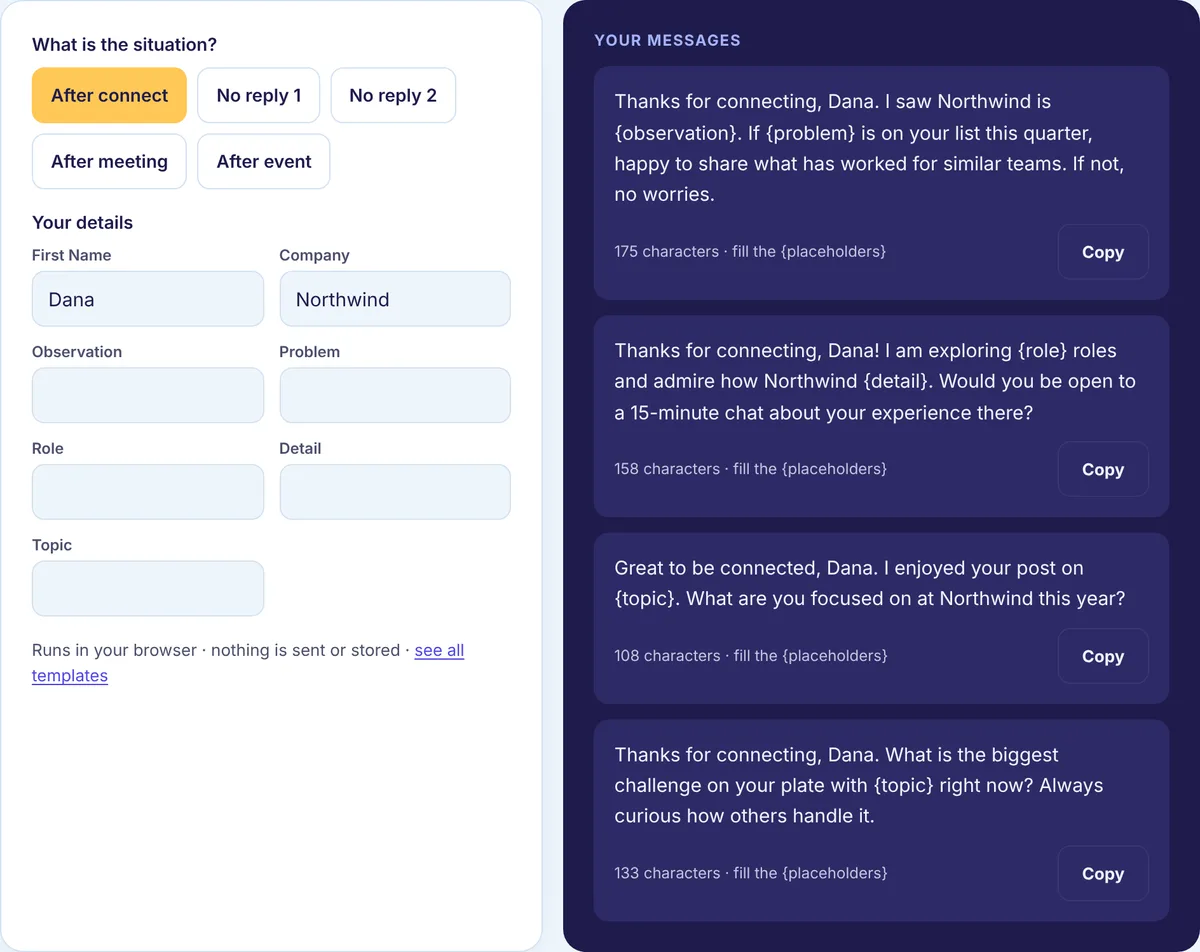
What we checked in our own follow-up templates
We wanted to see whether our templates follow the advice on this page, so we ran all 15 follow-up examples from our follow-up message templates through the same character counter our tools use.
Every one came out between 103 and 174 characters, or 20 to 32 words. That is two or three short sentences, which fits on a phone screen without scrolling. Eight of the 15 contain a question. The other seven make an offer, state a next step or close politely, which matches the “something new” rule: none of them is a bare “any update?”. Every one uses the person’s name.
You can run the same check on your own draft. Paste it into the LinkedIn Character Counter. If your follow-up is much longer than your first message, cut it back. A follow-up should be the easier message to answer, not the harder one.
How do you know if your follow-ups work?
Count. For a month, note how many people replied to your first message and how many replied only after a follow-up. Put both numbers into the Acceptance and Reply Rate Calculator and compare. Then change one thing, such as the question you ask or the day you wait, and check again the next month. Your own numbers beat any general rule, because your audience is not everyone’s audience.
Write your next follow-up
Pick the situation in the free Follow-up Message Generator, add the person’s name and what your first message was about, and copy a short draft to adjust. If the first message is the problem, start one step earlier with how to write a LinkedIn connection request, or read the full outreach process in our LinkedIn outreach guides.