Short answer: to use LinkedIn to find a job, rewrite your profile around the role you want, turn on Open to Work for the right titles, apply to fewer roles with more care, and send a short, specific message to a person for each one. Your network does a lot of the heavy lifting, because referrals and quick conversations open doors that applications alone often do not.
Job seekers tend to arrive with the same handful of questions, so this page is built around them. Answer them in order and you have a plan. At the end there is a five-day plan for your first week, if you would rather just be told what to do on Monday.
Do recruiters really search LinkedIn, and what do they type?
Yes. Recruiters search by job title, skills and location, then scan the results. That means your profile should use the words that describe the job you want, not only the one you have now. If you are a “Customer Champion” at a company with creative titles but you want a Customer Success Manager role, say Customer Success Manager in your headline.
Build the headline from three parts: the target title, your strongest proof, and the kind of team or industry you want. How to Write a LinkedIn Headline explains the formula, our guide to the LinkedIn headline for job seekers shows it for different situations, and the Headline Generator writes three versions from your details.
What should my About section say while I am looking?
Connect your past work to the role you want next. Open with what you do and what you are aiming for, add two or three concrete results, and end with how to reach you. The About Generator drafts one from your own facts and does not make anything up. A clear profile photo and a simple banner finish the first impression. Everything else on the profile, section by section, is in our profile optimization audit.
Should I turn on Open to Work?
For most people, yes. The setting lets you list the roles, locations, start dates and job types you want, and choose whether everyone sees it or only recruiters. Choosing recruiters only is the quieter option if you are currently employed. You do not need “seeking new opportunities” in your headline: the setting plus a headline built around your target role does that job better. Our guide LinkedIn Open to Work: Should You Use It? covers the trade-offs.
How many jobs should I apply to?
Fewer than you think, with more care. Save searches for your target titles and locations so new roles come to you, then apply to the ones that genuinely fit and adjust your resume to the job description. Easy Apply is fast, which is exactly why a quick, generic application through it can get lost. Our Easy Apply tips explain how to make those applications stand out.
Is it okay to message the recruiter after I apply?
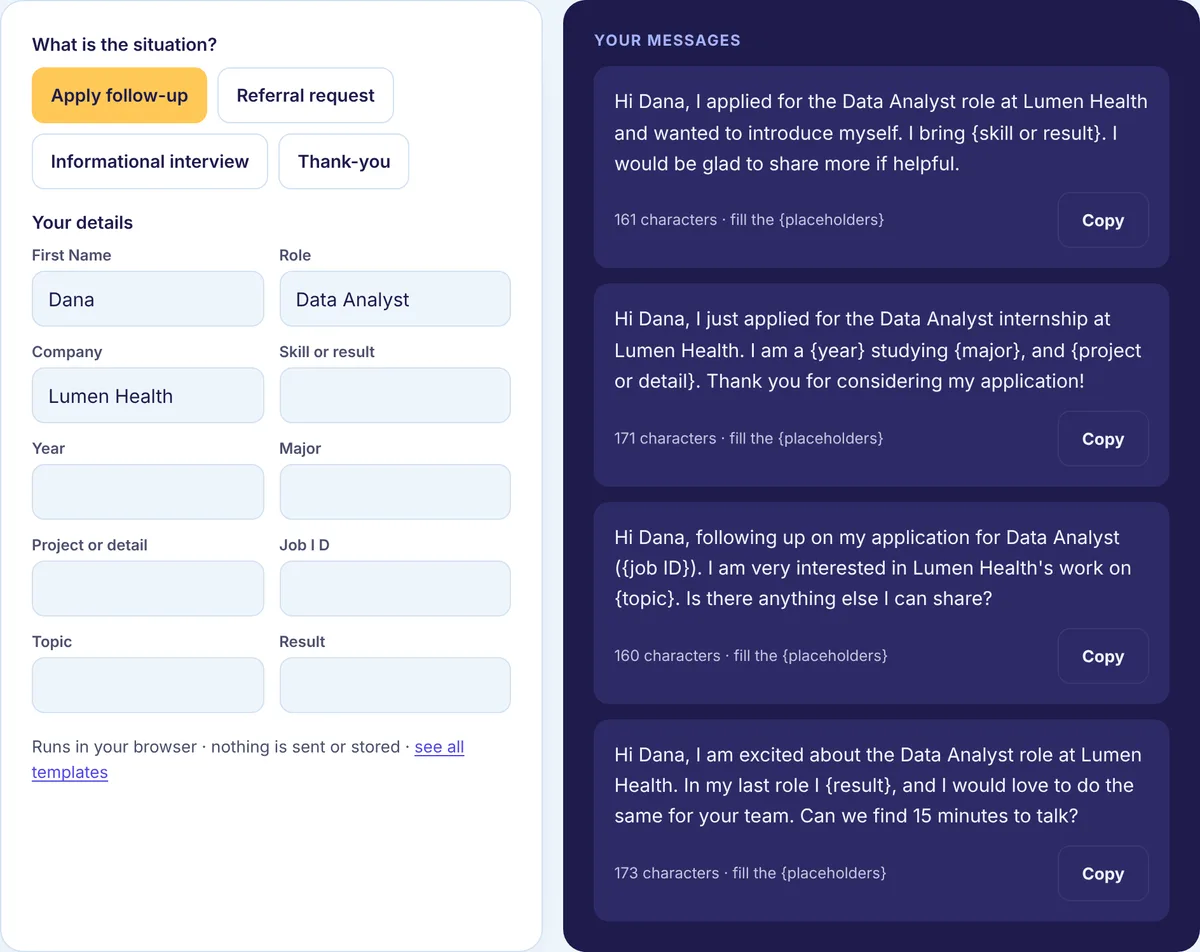
It is, and it is often the step that gets a person to look at your application. Recruiters read a lot of messages, so the ones that get answered name the role, give one reason you fit, and make one small ask. Three or four sentences is enough.
The Recruiter Message Generator fills ready messages for application follow-ups, referral requests, informational interviews and thank-you notes, and our recruiter message templates show every version side by side. For the full approach, read how to message a recruiter on LinkedIn.
How do I ask for a referral without being awkward?
Ask people who know your work: former colleagues, managers, classmates, people you have helped. Name the exact role, explain in a sentence why you fit, and make it easy by offering to send your resume and a two-line summary they can forward. Give them an easy way to say no. A referral puts their name behind yours, so it is a favor, not an obligation. How to Ask for a Referral on LinkedIn has scripts for warm and cooler contacts.
What if I do not know anyone at the company?
Start with informational conversations: short calls to learn about a job or a team. Ask for advice, not a job, keep it to about fifteen minutes, and come with two or three real questions. Alumni from your school or past employers are the easiest people to approach, because you already have something in common. The Connection Message Generator has alumni and after-event notes for starting those conversations, and How to Network on LinkedIn covers the longer game.
Do I need to post while I am job hunting?
You do not have to, but staying visible helps. You do not need to post about the search itself. Sharing what you are learning, a project you are proud of, or a useful take on news in your field shows how you think to people who might refer you. Commenting thoughtfully on posts by people at your target companies counts too. The Post Generator turns rough notes into a draft, and the Comment Generator helps you add to a conversation.
How long will this take?
It depends on your field, level, location and the market, and we are not going to quote an average we have not measured. What you control is the weekly rhythm: a few focused applications, a few personal messages and a little visible activity each week. That adds up.
Where to start this week
If you only have an hour a day, here is a plan for the first five working days. Adjust the order to fit your situation, but try not to skip day one.
| Day | Do this | Done when |
|---|---|---|
| Monday | Rewrite your headline and the first two lines of your About section around the target role | A stranger could guess the job you want from your headline alone |
| Tuesday | Set Open to Work with the right titles and locations, and save two or three job searches | New matching roles arrive by alert instead of you hunting for them |
| Wednesday | Write a list of 10 people who know your work, and 5 target companies | You have names, not just company logos |
| Thursday | Apply to one or two roles that fit, and send each recruiter a short note | Each application has a person attached to it |
| Friday | Send two referral or informational-chat requests from your list, and leave three real comments in your field | Two new conversations are open |
Next week, repeat Thursday and Friday, follow up on anything that went quiet after a few business days, and send a thank-you after every conversation, whether or not it led anywhere. People remember that.