A LinkedIn hook is the first line or two of your post, the part people see before “see more”. To write a good one, lead with the most interesting thing in the post, keep it to one short line, leave an empty line after it, and make a promise the rest of the post actually keeps.
Rules like that are easy to agree with and hard to apply. What helps more is seeing a weak opener turn into a strong one. So most of this page is rewrites: six common first drafts, each fixed using a different type of hook, with a note on what changed. All of them are examples we wrote for this page, not real posts.
If you would rather generate a few options from your topic, the free LinkedIn Hook Generator writes openers in six styles.
Rewrite 1: the warm-up becomes a story
Before: I wanted to take a moment to share some thoughts on customer onboarding and what I’ve learned over the years.
After: I lost my biggest customer last year.
The original spends twenty words getting ready to say something. The rewrite starts in the middle of a real moment, which is what a story hook does. You do not explain the lesson in line one. You make people want to know what happened.
Story hooks fit lessons from your own career or business. They only work if the story is true and the post delivers the lesson.
Rewrite 2: the safe opinion becomes a contrarian one
Before: Cold outreach can still be effective if done correctly.
After: Cold outreach is not dead. Lazy outreach is.
Nobody disagrees with the first version, which is exactly why nobody stops for it. The rewrite takes a side and draws a line between two things people usually lump together. Two short sentences, and the reader already knows what the post will argue.
A contrarian hook needs a real argument behind it. If the post underneath just repeats common advice, readers feel baited.
Rewrite 3: the vague claim becomes a number
Before: It took me a really long time to land my first product role.
After: It took me 47 applications to land my first product role.
“A really long time” could mean anything. A specific number gives the reader something to picture and compare with their own experience. Number hooks are strong, and that is why borrowed or rounded-up numbers do so much damage. Use a figure from your own work that you can stand behind, or do not use one.
Rewrite 4: the broad question becomes a pointed one
Before: What do you think about onboarding?
After: When did you last rewrite your onboarding emails?
The first question is too wide to answer in a comment. The second is specific, slightly uncomfortable, and something most readers can answer in a sentence. That makes it good for posts where you want replies.
Rewrite 5: the announcement becomes a list
Before: Here are some things I’ve learned about sales over my career.
After: 5 things I wish I knew at my first sales job:
Same promise, but the rewrite says exactly how many things, who they are for (people early in sales) and ends on a colon that pulls the eye down. List hooks are easy to skim and often get saved. Keep the number honest: if you promise five, deliver five.
Rewrite 6: the hedge becomes an admitted mistake
Before: Hiring is challenging and sometimes things don’t work out as planned.
After: My biggest hiring mistake cost us six months.
The original is so careful it says nothing. The rewrite admits something specific went wrong and puts a cost on it. Honest mistakes are relatable, and readers want to know what to avoid. If you are naming a cost, make sure it is real.
What every rewrite had in common
Look back at the six “after” lines. Each one:
- Is shorter than the original
- Names something specific: a customer, a number, a job, a cost
- Opens a gap the post has to close
- Sounds like something a person would say out loud
And each “before” made the same mistake in a different way: it described the topic instead of saying the interesting thing about it.
The two-line structure
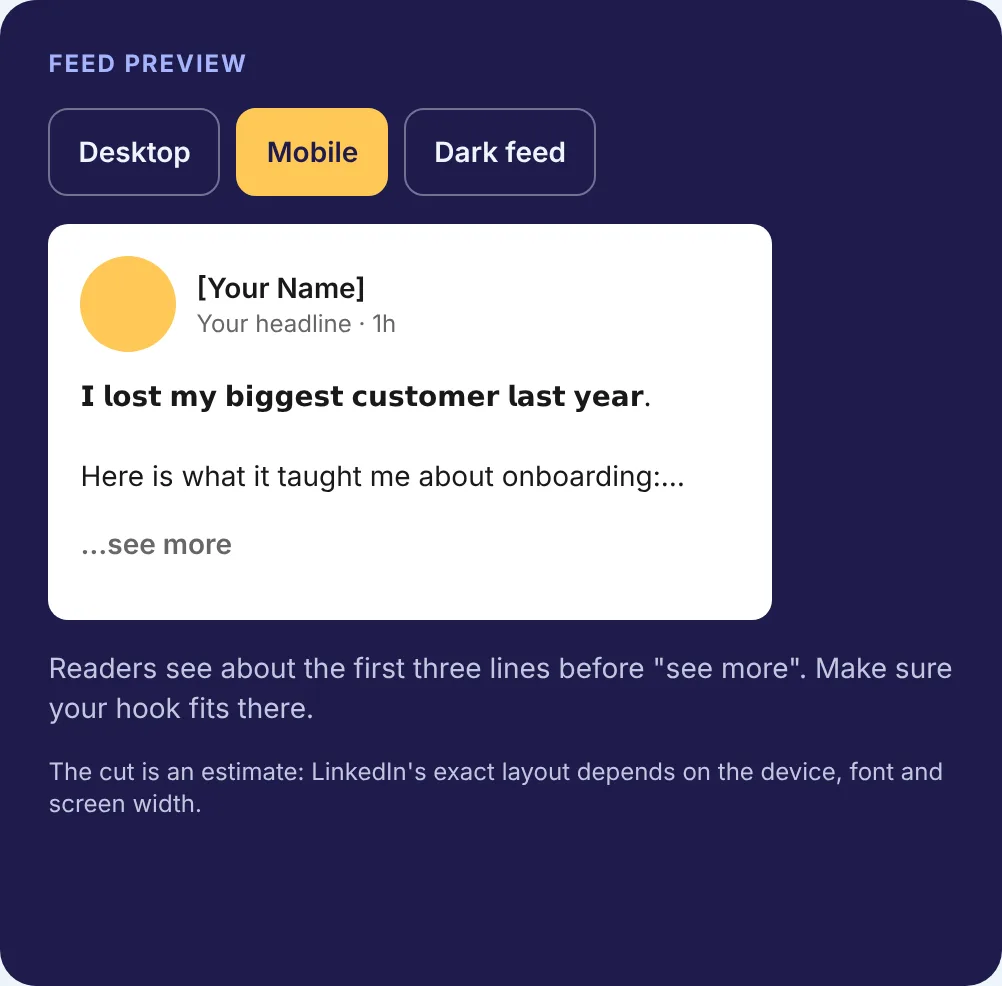
Most strong openings follow the same shape. Line one stops the scroll. An empty line gives it room. Line two pulls the reader into the rest.
I lost my biggest customer last year.
Here is what it taught me about onboarding:
Line one is the tension. Line two is the promise. Together they fit above “see more” on most screens. You can check your own draft in the LinkedIn Post Preview, which shows desktop and mobile.
How long a hook can be
Short enough to fit on one line on a phone. There is no exact character count for the cut, because “see more” depends on line breaks and screen width, not a fixed number. The see more fold explains how that cutoff behaves. Our rule of thumb: if your first sentence wraps onto a second line on mobile, it is doing too much.
How we checked bold hooks
Some people make the hook bold with Unicode letters, since LinkedIn posts have no built-in bold. We ran the example hook through the same function our Text Formatter uses and measured the result.
- “I lost my biggest customer last year.” is 37 characters as plain text.
- The bold version is also 37 characters when you count each visible letter, which is how our counter counts.
- Measured in UTF-16 code units, the way many programs count text internally, the bold version is 67, because each bold letter is a character from outside the basic alphabet.
- A plain-text search for the word “customer” does not match the bold version, because the bold letters are different characters.
What this means in practice: bold can make a hook stand out, but use it on one line at most, keep searchable words in plain text, and know that some screen readers may read styled letters oddly. Our glossary entry on Unicode text formatting covers the trade-offs.
Where hooks usually go wrong
- Throat-clearing: “I wanted to take a moment to share…” Start with the thought.
- Vague promises: “This changed everything.” Say what changed.
- Clickbait the post cannot back up. Readers notice, and it costs more than a quiet post.
- Statistics you cannot source. Use your own numbers or none.
- Hashtags or mentions in the first line, which push the real hook down.
Write five, keep one
Your first hook is rarely your best. Write five versions in different styles, or start from our LinkedIn hook templates, then run three quick tests:
- Would a stranger stop for this line?
- Does the post deliver exactly what the hook suggests?
- Does it fit above “see more” in the mobile preview?
The version that passes all three and sounds most like you is the one to post.
Hook checklist
- One short line, followed by an empty line
- Specific to the topic of this post
- Creates a question, tension or promise
- Uses only facts and numbers you can back up
- Fits above “see more” on mobile
- Sounds like something you would say out loud
To get a few options fast, try the free LinkedIn Hook Generator and edit the one closest to your voice. For more openers sorted by type, browse the LinkedIn hook examples.