LinkedIn lead generation is finding people who match your ideal customer, giving them a reason to recognize you, and starting real conversations through a few planned, personal messages. It is not a volume game. Ten researched contacts with a clear reason to talk will usually do more than a hundred generic requests.
The work breaks into seven stages. The table is the version you can keep open on a second screen. Everything below it goes deeper on each stage, using one example business throughout.
The seven stages at a glance
| Stage | What you do | What you end up with |
|---|---|---|
| 1. Define a lead | Write one sentence saying what counts | A clear finish line |
| 2. Target | Pick the company type, role and trigger | A narrow, timely audience |
| 3. Profile | Rewrite headline, About and Featured for buyers | A profile that answers “can they help me?” |
| 4. List | Research a small set of people who fit | Names, triggers and one real detail each |
| 5. Warm up | Comment and post for a few days | A name people have seen before |
| 6. Sequence | Send three to five planned, useful touches by hand | Replies |
| 7. Track | Measure each step and fix the weakest one | A better month next month |
The example: Morgan runs a small agency that builds help centers for software companies. Morgan wants more discovery calls without buying lists or using tools that send messages automatically.
Stage 1: decide what a lead actually is
Skip this and you cannot tell whether anything is working. A connection is not a lead. A like on your post is not a lead. A lead is someone who fits your target and has shown interest: replied, asked a question, requested a resource or agreed to a call.
Write yours in one sentence. Morgan’s: “A lead is a head of support at a software company with a growing team who has agreed to a short call.”
Stage 2: narrow the target
Most lead generation goes wrong right here, with a target so broad that no message can be specific. Narrow on three levels.
- Company: industry, size range, region, and a situation that makes your offer timely.
- Role: the people who feel the problem and the people who decide.
- Trigger: something visible on LinkedIn that suggests now is the moment, such as a new role, a hiring post, a launch, or a post about the exact problem you solve.
Morgan’s version: heads of support at software companies of 50 to 300 people. The trigger is a job post for support reps, because a team about to onboard new people needs good help docs.
The trigger is the most useful of the three. It gives you something true and timely to mention, which is the hardest part of any first message.
Stage 3: make the profile ready for buyers
When outreach works, people click your name. Your profile then has a few seconds to answer one question: who is this, and can they help me?
If your profile reads like a resume and your goal is clients, fix it before you send anything.
- Headline: who you help and with what. “Help centers for growing support teams” tells a buyer more than “Founder at Morgan & Co.”
- About: the problem you solve, how you work, and what to do next, in short paragraphs that read well on a phone.
- Featured: one proof item, like a case study or a useful guide. LinkedIn featured section ideas has more options.
Stage 4: build a small, researched list
Search LinkedIn for your roles and company types, then keep the people who match your trigger. Many sales teams use LinkedIn’s paid sales product at this stage; the LinkedIn Sales Navigator guide covers what it adds over a free account.
Keep the list small enough to research properly. A spreadsheet with four columns is enough:
| Name | Role and company | Trigger | One real detail |
|---|---|---|---|
| Dana (example) | Head of Support, a 120-person software company | Posted two support rep openings | Wrote a post about ticket deflection last week |
If you cannot fill in the last column for someone, move on. That detail is what keeps your message from sounding like everyone else’s. Never buy or scrape contact lists: it breaks LinkedIn’s rules, and the people on those lists never asked to hear from you.
Stage 5: warm up before you connect
People respond more readily to a name they have seen. For a few days before connecting:
- Leave comments on their posts that add a point or ask a real question.
- Publish something useful about the problem you solve.
- React to or share their company’s news when it is relevant to you.
This is not a trick. It gives people a reason to recognize you and a sense of how you think. If your comments tend to come out as “Great post!”, the LinkedIn commenting strategy guide can help.
Stage 6: follow a short sequence, by hand
A sequence is three to five planned touches over two to three weeks. Every touch should be worth receiving on its own. Morgan’s plan for Dana:
| Day | Touch | Purpose |
|---|---|---|
| 0 | Comment on her ticket deflection post | Become a familiar name |
| 2 | Connection request mentioning that post | Connect with a real reason |
| 5 | First message asking how they plan to onboard the new reps | Start a conversation about the trigger |
| 10 | Offer a short help center checklist | Add something useful |
| 17 | Final note that leaves the door open | Close politely |
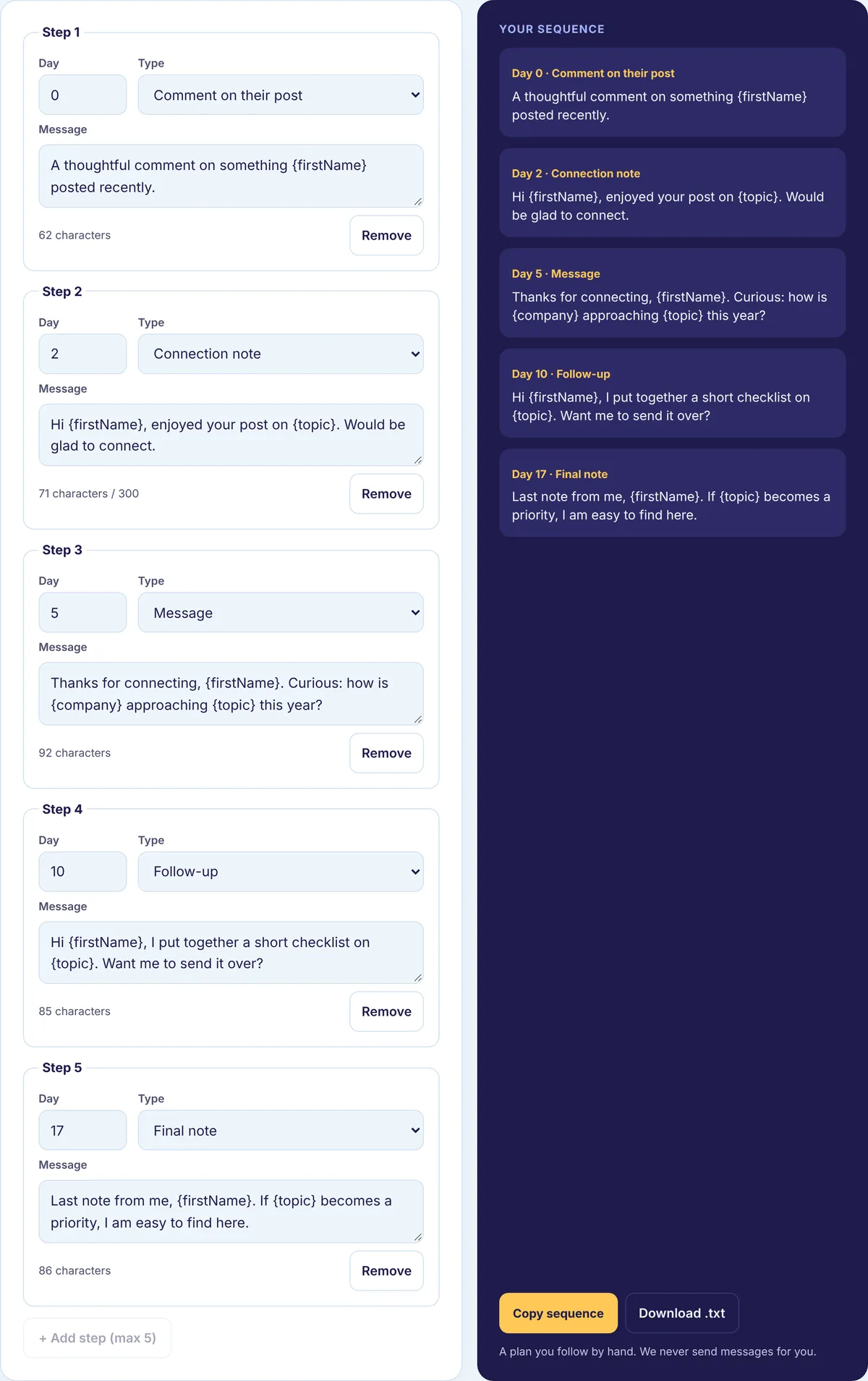
Our free Outreach Sequence Builder starts with this same five-step shape (days 0, 2, 5, 10 and 17) and lets you edit each step, change the days, and keep between three and five steps. It sorts the steps by day and exports a plain plan you can copy. It does not send anything. You send every message yourself, which is the point: LinkedIn’s User Agreement does not allow bots for connecting or messaging, and is LinkedIn automation safe explains the risk to your account.
For the wording of the first message, see how to write a LinkedIn cold message.
When someone replies
Answer quickly and keep the next step small. Ask one question about their situation before suggesting a call. When a call does make sense, offer two specific times or a short agenda so yes takes no effort.
Thanks, Dana. Sounds like the new reps start next month. Would a 15-minute call on Tuesday or Thursday help? I can walk through how I’d set up a help center before onboarding starts.
Log every reply and meeting with the date and the touch that led to it.
Stage 7: track, then fix the weakest step
Once a month, write down four pairs of numbers:
- Connection requests sent, and accepted
- Messages sent, and replied to
- Replies, and the ones that became meetings
- Meetings, and the ones that became leads by your Stage 1 definition
Divide the second number by the first for each rate. Here is a purely illustrative month: 40 requests and 18 accepted is 45 percent; 18 messages and 5 replies is about 28 percent; 5 replies and 2 meetings is 40 percent. In that example, the reply step is the leak, so the first message is what to rewrite.
We do not publish benchmark rates, because they depend entirely on who you contact and how warm the relationship is. Compare yourself with your own previous month. As a rule of thumb, low acceptance points at your targeting or note, low replies point at the first message, and few meetings point at the ask. The Acceptance Rate Calculator does the arithmetic for you.
A week that keeps it running
A few hours a week, spread out, is enough for a small business:
- Monday: add a handful of new people to the list, each with a trigger and one detail.
- Tuesday to Thursday: comment on posts from your list, send that day’s planned touches, answer every reply.
- One day: publish one useful post about the problem you solve.
- Friday: update the numbers and pick one change to try next week.
Habits that sink lead generation
- Pitching inside the connection note
- Sending fifty generic messages instead of ten researched ones
- Asking for a meeting before you have given anything
- Changing three things at once, so you never learn which one mattered
- Giving up after one touch, or continuing after five
Start your plan
Open the free Outreach Sequence Builder, set three to five touches for your first ten names, and export the plan. Our LinkedIn outreach guides cover connection notes, follow-ups and cold messages in more detail.